Settings to use
Open Settings, Agent tab. Set Industry to Service and Personality to Direct: short and plain, and it gets to the question. A homeowner with a broken AC wants a time, not a chat.
Service is the industry for home services, med spas and gyms. With it set, the setter already knows:
- Leads want to know what it costs, how soon someone can come out, and whether you cover their area.
- It asks one question, what they need done or how soon, then books.
- It quotes only the prices and service area you give it.
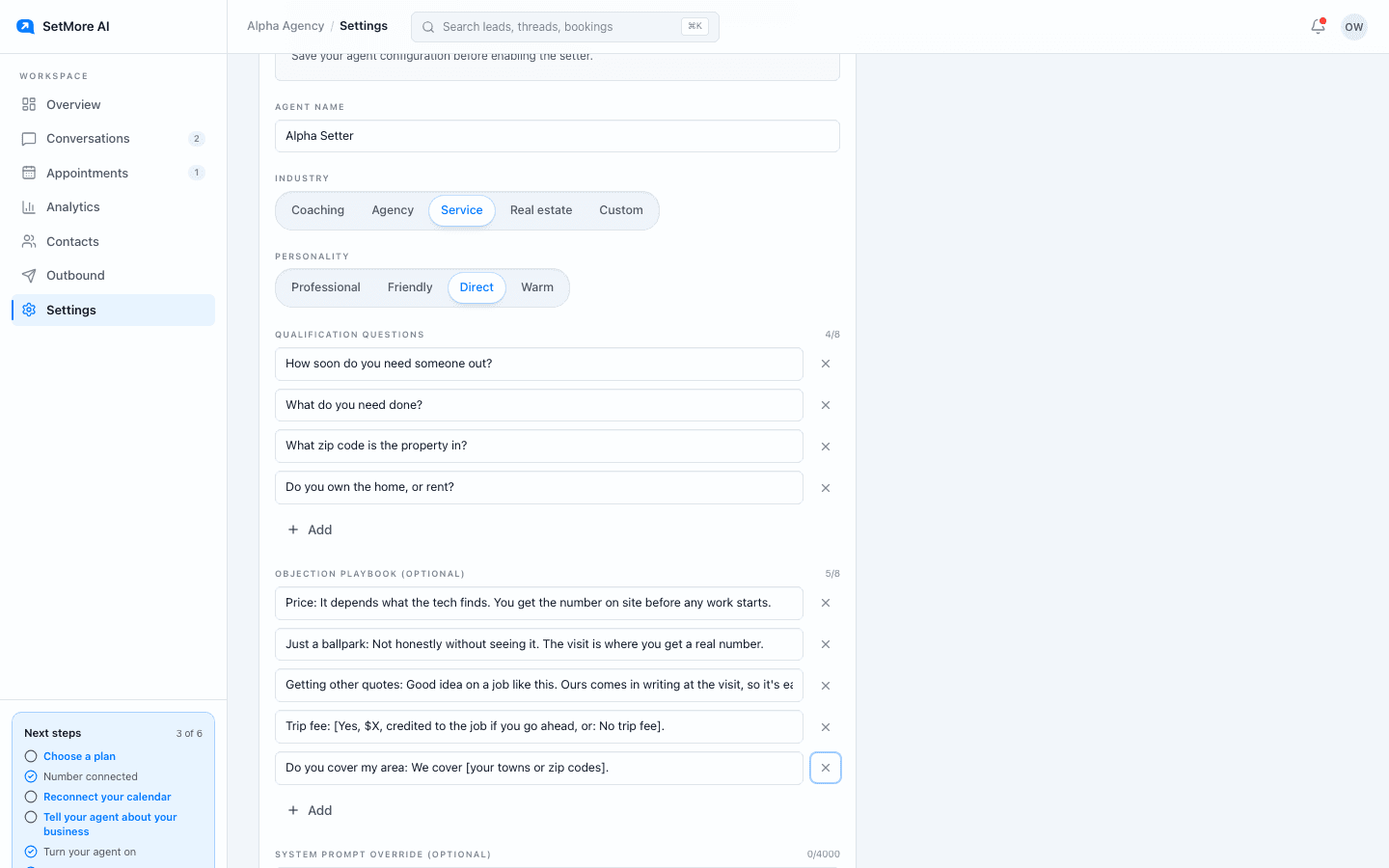
Qualification questions
Paste these into Qualification questions, one per line. The setter asks one of these per conversation, the one it needs to book, then offers two times. A money question always comes last.
- How soon do you need someone out?
- What do you need done?
- What zip code is the property in?
- Do you own the home, or rent?
Objection playbook
Paste these into Objection playbook and replace anything in square brackets. On a real objection the setter first asks one short question to find the actual reason, once per conversation. The next turn it answers from your entry in one sentence and offers two times again.
- Price: It depends on what the tech finds. You get the number on site before any work starts.
- Just a ballpark: Not honestly without seeing it. The visit is where you get a real number.
- Getting other quotes: Good idea on a job like this. Ours comes in writing at the visit, so it's easy to compare.
- Trip fee: [Yes, $X, credited to the job if you go ahead, or: No trip fee].
- Do you cover my area: We cover [your towns or zip codes].
A sample thread
What a booked thread looks like with these settings. Each setter line goes out as its own text.
- Lead: ac is blowing warm air, can someone come look
- Setter: We can get someone out
- Setter: How soon do you need someone out?
- Lead: asap its hot in here
- Setter: Tue 8am or Wed 1pm?
- Lead: how much is it gonna be
- Setter: Depends on what the tech finds
- Setter: You get the number on site before any work starts. Tue 8am or Wed 1pm?
- Lead: tue
- Setter: Tue 8am, locked in
- Setter: Who do I put it under?
- Lead: Rob
- Setter: Thanks Rob. What's a good email to shoot the invite to?
- Lead: rob@example.com
- Setter: I'll send the invite there. See you Tue
What to leave out
Three things to keep out of your questions and playbook.
- Ballpark prices you would not honour on site. The setter quotes whatever your playbook says.
- Card details. The setter never asks for them, so take deposits the way you do today.
- Vague coverage. If you only work some areas, list them in the playbook; the setter will not guess.
Questions people ask
- Can the setter dispatch an emergency call?
- No. It books from the open times on your calendar, and it hands the thread to your team when a lead asks for something it cannot do from a text. Read those threads fast.
- How does the setter know my hours?
- From Settings, Calendar: one open and close window per day, plus slot length, buffer, notice and how far ahead leads can book. Lower the notice if you take same-day jobs.